



About your order
Order flow
1. Add the product to your cart
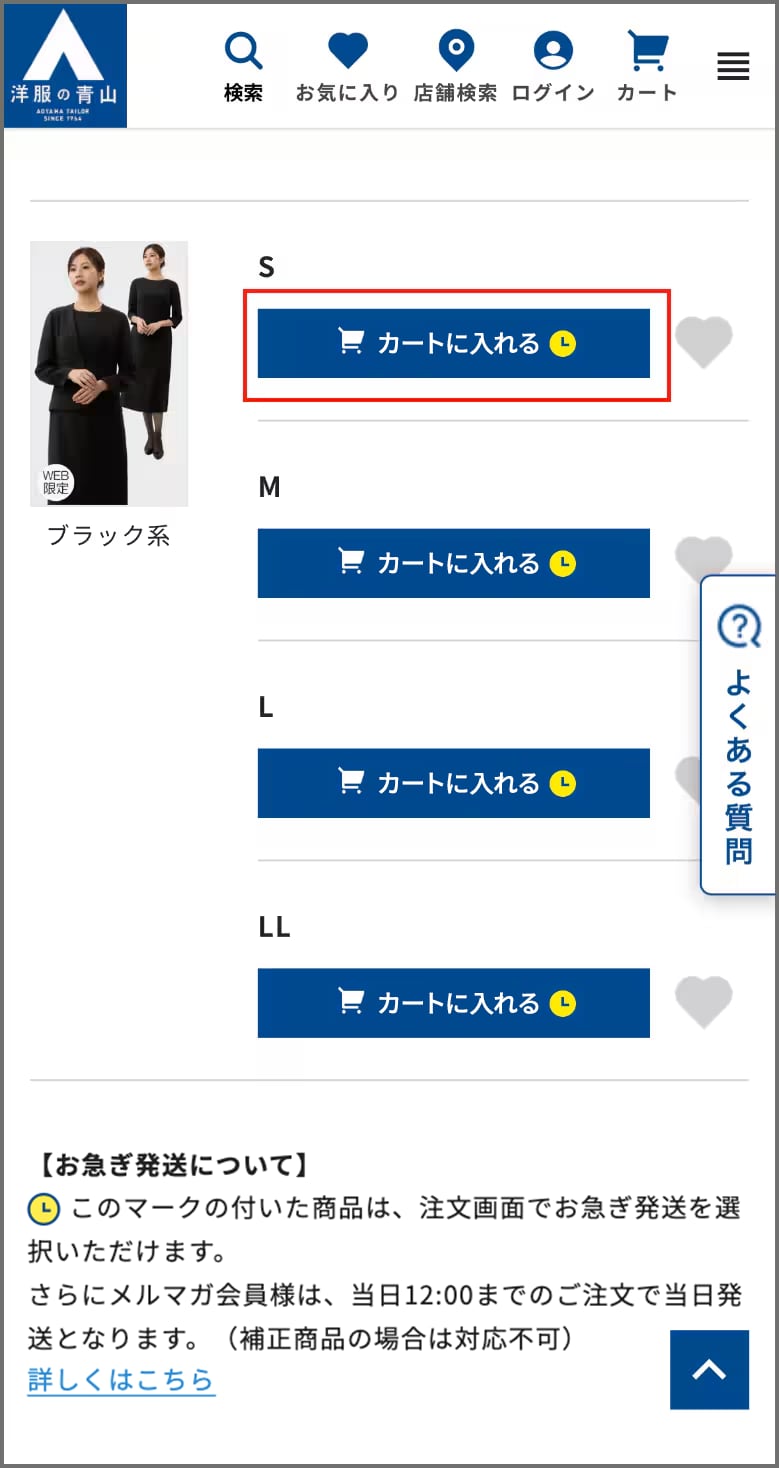
Select your color and click "Add to Cart" next to the size.
*Products eligible for adjustments/options can be specified on the cart screen.
 Products with this mark are eligible for our "Expedited Shipping Service", which will ship the product on the same day at the earliest.
*Products eligible for adjustments/options can be specified on the cart screen.
Products with this mark are eligible for our "Expedited Shipping Service", which will ship the product on the same day at the earliest.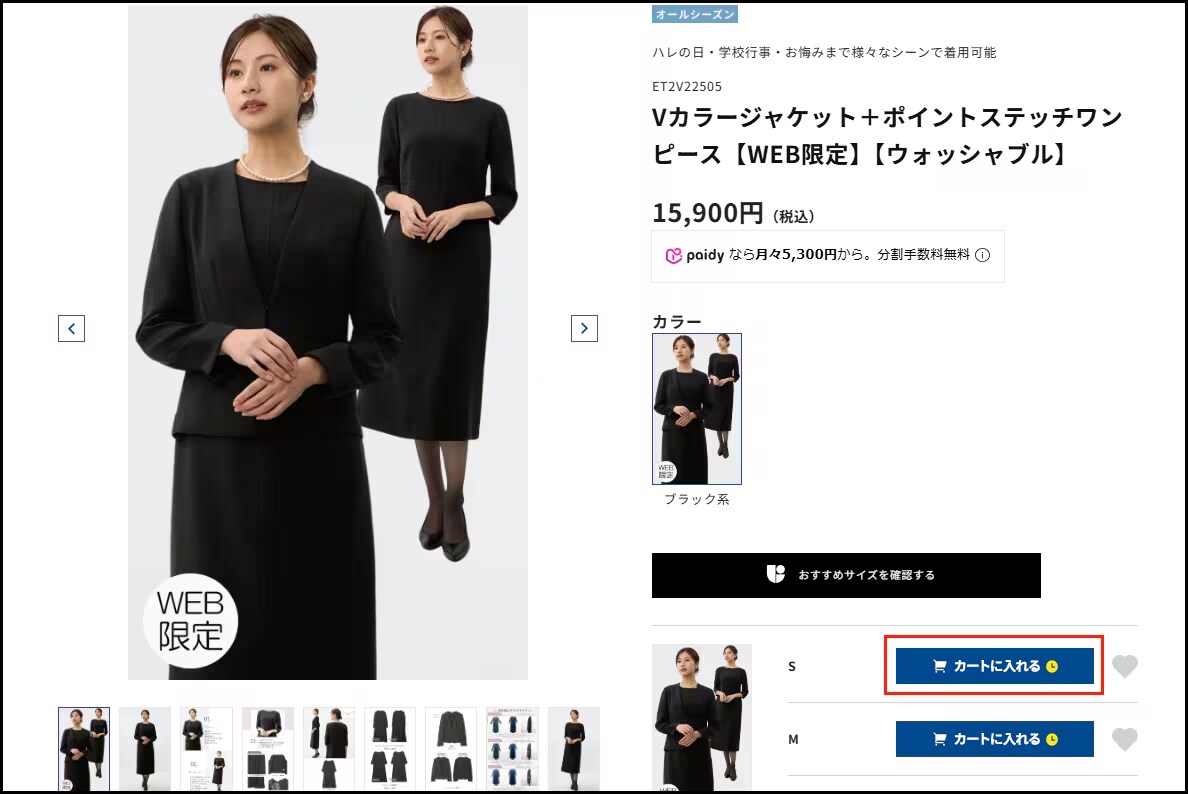
2. Proceed to checkout
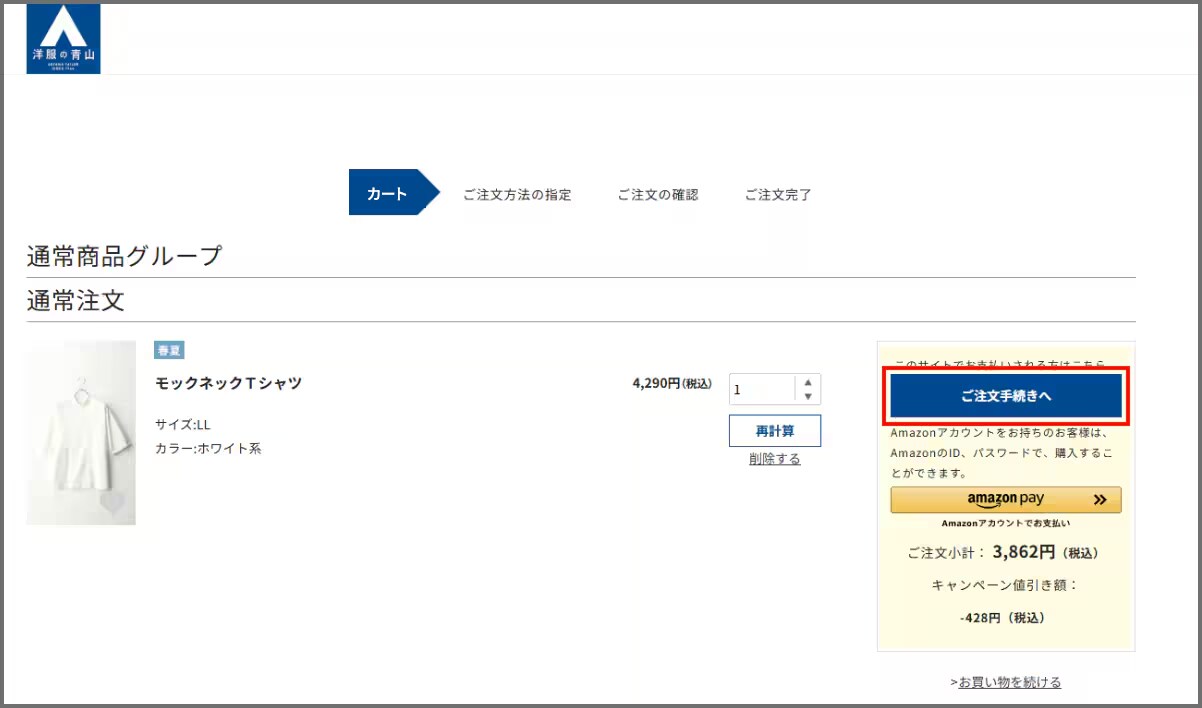
After you have added all of the items you want to your cart, click "Cart" on the top right of the screen to check the items in your cart.
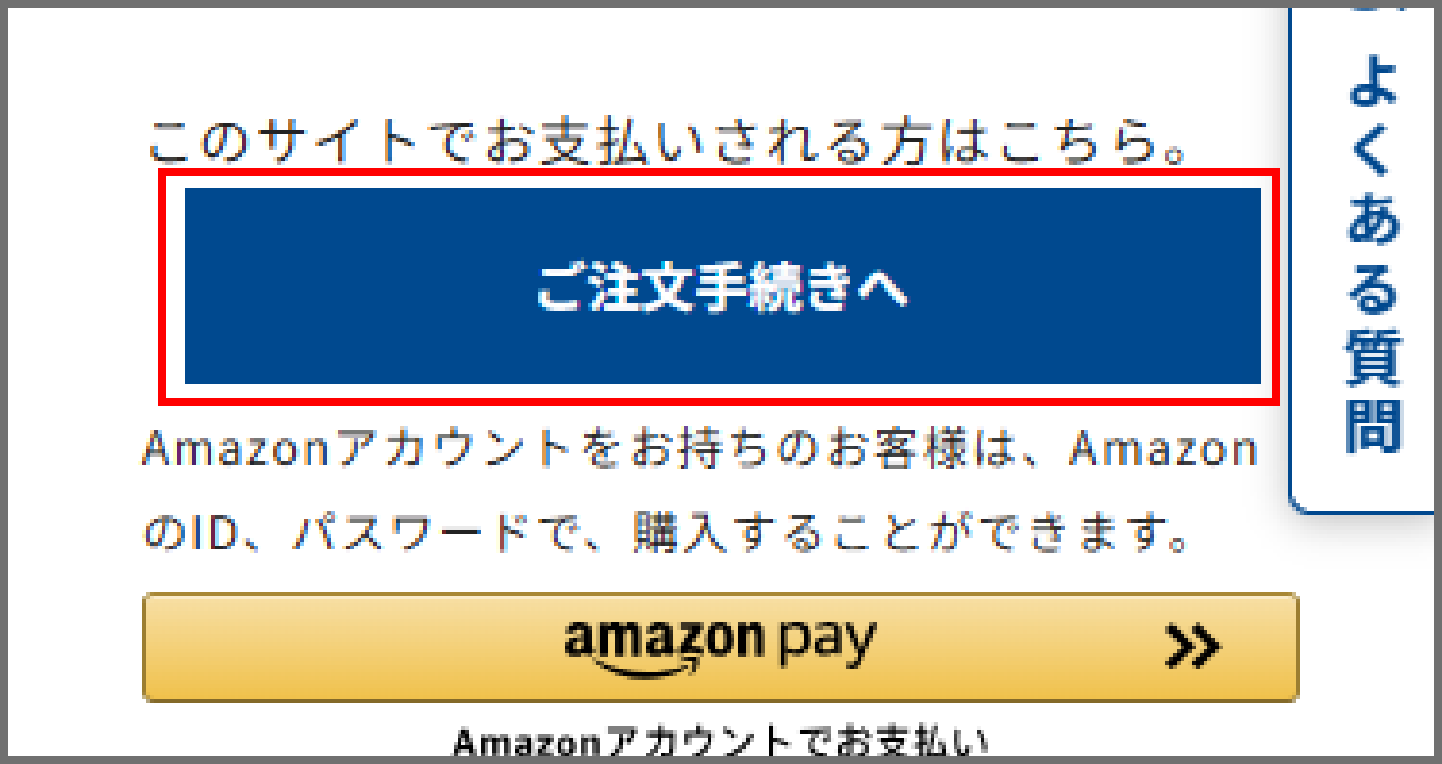
To proceed to checkout, click "Proceed to Checkout".
To proceed to checkout, click "Proceed to Checkout".
3. Enter your information
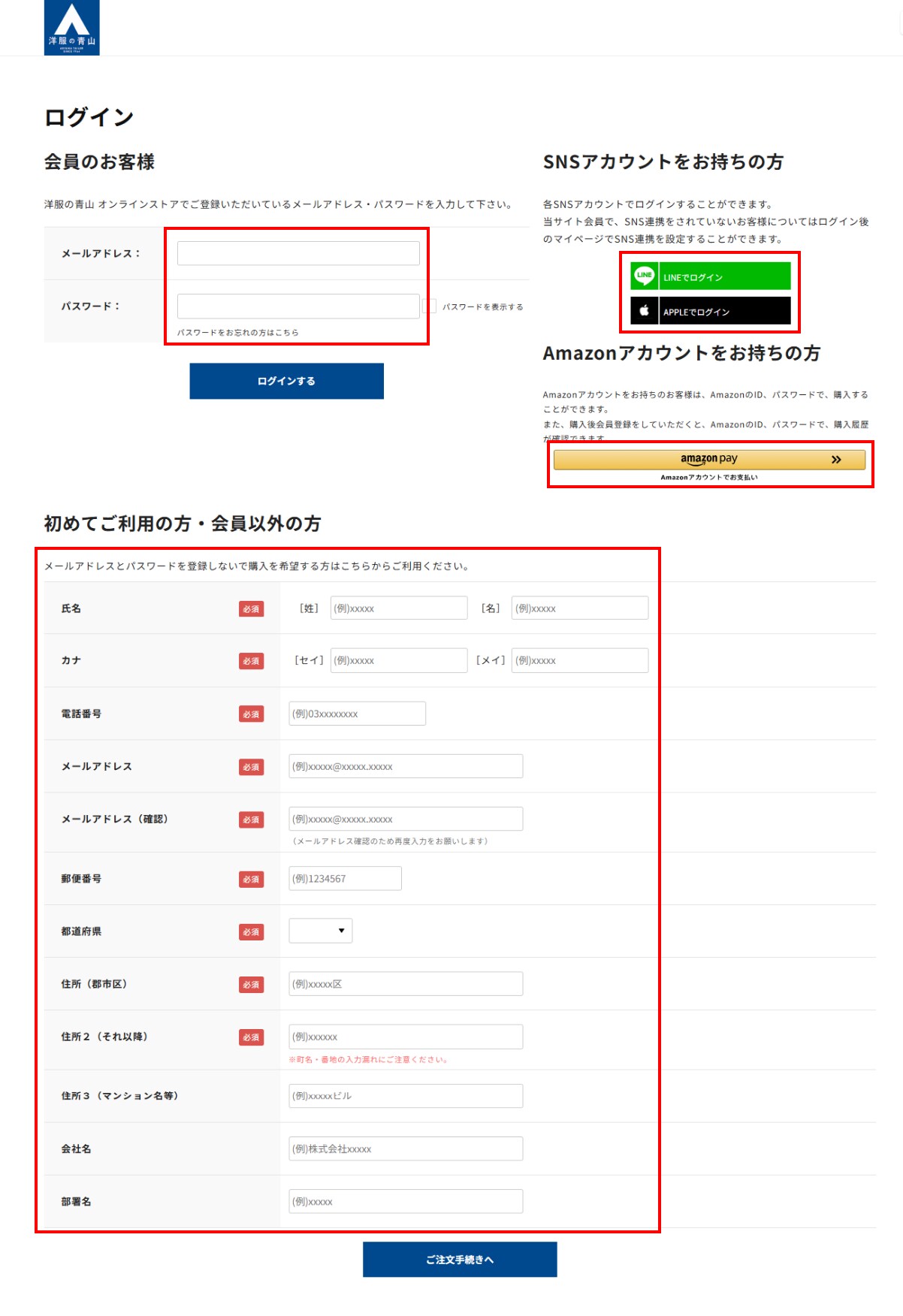
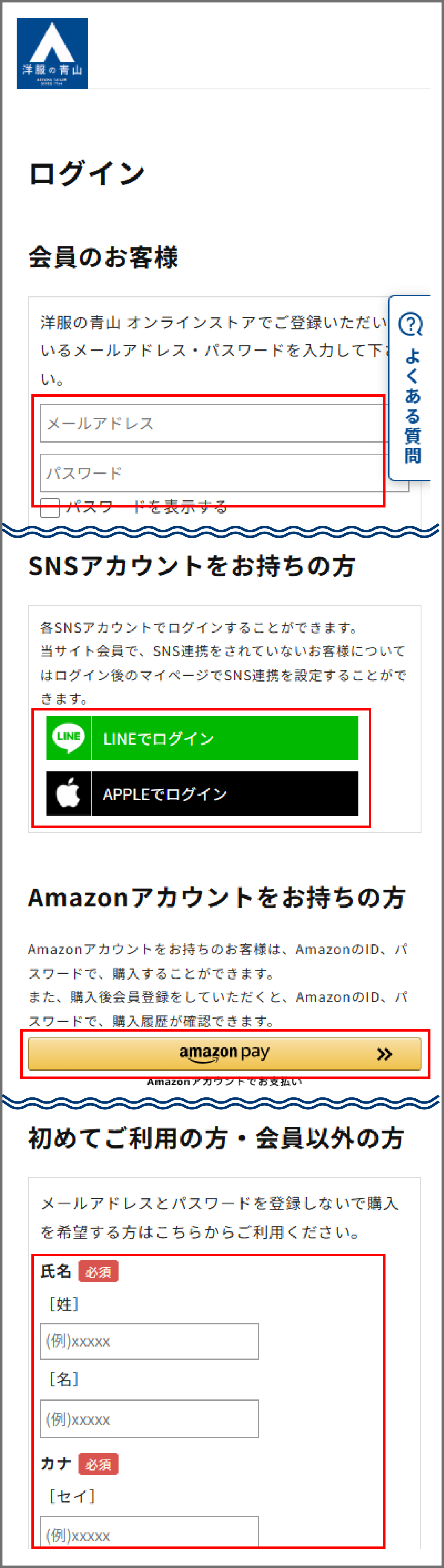
Already a WEB member
Please enter your registered email address and password to log in.
If you have an Amazon account
If you have an Amazon account, you can make a purchase using your Amazon ID and password.
Also, if you register as a member of this site after making a purchase, you will be able to check your purchase history using your Amazon ID and password.
For those who have a LINE or Apple account
If you are a member of this site and have linked your LINE or Apple account, you can log in using your LINE or Apple account.
First time users
Click on "New Member Registration" on the page to register as a new member.
Please enter your registered email address and password to log in.
If you have an Amazon account
If you have an Amazon account, you can make a purchase using your Amazon ID and password.
Also, if you register as a member of this site after making a purchase, you will be able to check your purchase history using your Amazon ID and password.
For those who have a LINE or Apple account
If you are a member of this site and have linked your LINE or Apple account, you can log in using your LINE or Apple account.
First time users
Click on "New Member Registration" on the page to register as a new member.
If you wish to purchase without registering your email address and password, please fill in the required information and click "Proceed to Order".
*Please be careful not to make any mistakes when entering your information.
*Please be careful not to make any mistakes when entering your information.
4. Specify the ordering method
Please enter your delivery address, shipping information, and payment information.
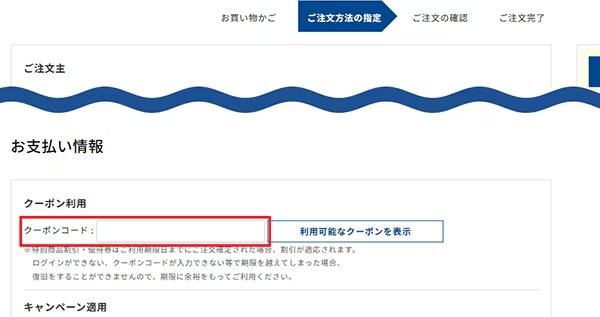
If you would like to use a coupon, please enter the coupon in the "Use coupon" field and make sure the coupon details are displayed in the "Applicable coupon" field on the next page.
You can choose your payment method from the options below.
■Store pickup: Credit card (single payment only) / PayPay
■Delivery to your specified address: Credit card, PayPay, Amazon Pay, Paidy (post-payment) [additional fee applies], Mirai Barai (post-payment) [additional fee applies], Cash on delivery [additional fee applies]
After entering your information, please click the "Proceed to final order confirmation" button.
■Store pickup: Credit card (single payment only) / PayPay
■Delivery to your specified address: Credit card, PayPay, Amazon Pay, Paidy (post-payment) [additional fee applies], Mirai Barai (post-payment) [additional fee applies], Cash on delivery [additional fee applies]
After entering your information, please click the "Proceed to final order confirmation" button.
5. Order Completed
Please confirm your order details and click the "Confirm Order" button.
The order completion screen will be displayed and an automatic reply order confirmation email will be sent to the email address you entered, so please check it.
*Since we share product inventory with stores and various mall sites, there may be times when items are out of stock and you are unable to complete your order.
(Even for urgent orders, you may not be able to select this service depending on the timing of your order.)
The order completion screen will be displayed and an automatic reply order confirmation email will be sent to the email address you entered, so please check it.
*Since we share product inventory with stores and various mall sites, there may be times when items are out of stock and you are unable to complete your order.
(Even for urgent orders, you may not be able to select this service depending on the timing of your order.)
Confirm order details and delivery status
After completing your order, please check the contents of the "Order Completion Email" sent to LINE linked to your registered email address or registered phone number.
You can also check your order history from "Check your order history/delivery status".
You can check the delivery status of your product by accessing the package inquiry system of Yamato Transport Co., Ltd. or Japan Post Co., Ltd. and entering your package slip number.
You can also check your order history from "Check your order history/delivery status".
You can check the delivery status of your product by accessing the package inquiry system of Yamato Transport Co., Ltd. or Japan Post Co., Ltd. and entering your package slip number.
Changing or cancelling your order after it has been completed
Changing your order after placing it
Due to system limitations, once an order has been confirmed, we cannot add, change, or delete products or change payment methods.
If you wish to make changes, please cancel your order from "Order/Purchase History" on your My Page while the order status is "Order Completed," and then place a new order with the desired details.
*If you cancel, all of your order will be canceled.
*Please note that the item may be out of stock when you place your order again.
If you wish to make changes, please cancel your order from "Order/Purchase History" on your My Page while the order status is "Order Completed," and then place a new order with the desired details.
*If you cancel, all of your order will be canceled.
*Please note that the item may be out of stock when you place your order again.
Cancellation of your order
You can only cancel your order if the processing status shown in your purchase history is "Order confirmation in progress."
Please note that we cannot accept cancellations in the following processing states.
- "Preparing for shipment"
・"Shipped"
Please note that we cannot accept cancellations in the following processing states.
- "Preparing for shipment"
・"Shipped"
Cancellation procedure
- 1. Access your My Page on the Aoyama Clothing app or website
- 2. Select "Purchase and Reservation History"
- 3. Select the relevant order ID from the "Purchase History List"
- 4. Check your order and select "Cancel this order" at the bottom of the page.
- 5. Enter the reason for cancellation and click "Cancel"
- 6. On the "Purchase/Reservation History" screen, please confirm that the processing status is displayed as "Cancelled."
*Before completing your order, please be sure to check details such as product number, size, quantity, payment method, shipping address, and contact information.
*We cannot accept cancellations (including refusal to accept) if the processing status is other than "Order confirmation in progress" or after the product has been shipped.
*Even if the processing status is displayed as "Order confirmation in progress", it may not be possible to cancel your order depending on the contents and timing of your order.
*Various coupons, special product discount vouchers, preferential coupons, product discount vouchers with stamps, etc. will be refunded if your order is canceled.
However, please note that coupons and discount vouchers that no longer meet the terms of use due to expiration date or other reasons cannot be used again.
*We cannot accept cancellations (including refusal to accept) if the processing status is other than "Order confirmation in progress" or after the product has been shipped.
*Even if the processing status is displayed as "Order confirmation in progress", it may not be possible to cancel your order depending on the contents and timing of your order.
*Various coupons, special product discount vouchers, preferential coupons, product discount vouchers with stamps, etc. will be refunded if your order is canceled.
However, please note that coupons and discount vouchers that no longer meet the terms of use due to expiration date or other reasons cannot be used again.
How to purchase without registering
(Guest order)
If you place an order without registering or logging in (guest order),
Once your order is complete, an "Order Completion Email" will be automatically sent to the email address you registered when placing your order.
Please check the details of your order in the "Order Completion Email".
If you use Amazon pay, please log in with your Amazon account and proceed to the procedure.
Once your order is complete, an "Order Completion Email" will be automatically sent to the email address you registered when placing your order.
Please check the details of your order in the "Order Completion Email".
If you use Amazon pay, please log in with your Amazon account and proceed to the procedure.
Notes
- It will not be reflected in your "Purchase History" on your My Page.
- You will not be able to check your purchase history, issue receipts, or cancel your order.
If you wish to cancel, please contact customer support.
・Points will not be awarded (we cannot integrate member information or award points after a guest purchase).
・ご注文時に「e-shopinfo@aoyama-syouji.co.jp」及び「noreply@y-aoyama.jp」からのメール受信許可を設定してください。
・If you do not know your order number and have not received an order completion email, it is possible that your order was not completed successfully.
If you would like to confirm, please contact our customer support desk.
- Once an order has been placed, it is not possible to change the payment method or desired delivery date and time.
- You will not be able to check your purchase history, issue receipts, or cancel your order.
If you wish to cancel, please contact customer support.
・Points will not be awarded (we cannot integrate member information or award points after a guest purchase).
・ご注文時に「e-shopinfo@aoyama-syouji.co.jp」及び「noreply@y-aoyama.jp」からのメール受信許可を設定してください。
・If you do not know your order number and have not received an order completion email, it is possible that your order was not completed successfully.
If you would like to confirm, please contact our customer support desk.
- Once an order has been placed, it is not possible to change the payment method or desired delivery date and time.
About payment methods
When ordering from our online store, you can choose from the following payment methods:
1. Pay by credit card
Available cards

*The usage fee will be borne by "Aoyama Clothes".
*Credit cards other than those in your name cannot be used.
*Debits will be made on the payment date of each credit card company.
*If we suspect unauthorized use, we will cancel your order.
*For orders where you choose credit card payment, we may check the fraud detection service and send you an order confirmation email.
*Credit cards other than those in your name cannot be used.
*Debits will be made on the payment date of each credit card company.
*If we suspect unauthorized use, we will cancel your order.
*For orders where you choose credit card payment, we may check the fraud detection service and send you an order confirmation email.
Payment method
Payment by credit card is only accepted as a one-time payment.
2. Pay with PayPay
This is a cashless payment service provided by PayPay Inc.
Payment can be made via PayPay, allowing you to shop smoothly anytime and anywhere without having to enter credit card information or go through separate payment procedures.
*For information on how to pay with PayPay, please check the PayPay Co., Ltd. page.
*If you use PayPay, if you go back on your browser or close the page during payment, the payment may be interrupted and your order may not be completed successfully.
In this case, your order will not be completed, so it will not be listed in your order history, and PayPay will display a payment failure and refund your payment.
If your PayPay account shows a message that your payment has failed, please place your order again.
Payment can be made via PayPay, allowing you to shop smoothly anytime and anywhere without having to enter credit card information or go through separate payment procedures.
*For information on how to pay with PayPay, please check the PayPay Co., Ltd. page.
*If you use PayPay, if you go back on your browser or close the page during payment, the payment may be interrupted and your order may not be completed successfully.
In this case, your order will not be completed, so it will not be listed in your order history, and PayPay will display a payment failure and refund your payment.
If your PayPay account shows a message that your payment has failed, please place your order again.
3. Pay with deferred payment
Simply enter your email address, mobile phone number, and the 4-digit verification code sent to you via SMS to make your purchase.
The usage amount for one month will be determined on the 1st of the following month and will be notified by email and SMS.
Payment can be made at a convenience store, by bank transfer, or by bank transfer. A payment fee will be charged depending on the payment method (only once a month, regardless of the number of uses).
The usage amount for one month will be determined on the 1st of the following month and will be notified by email and SMS.
Payment can be made at a convenience store, by bank transfer, or by bank transfer. A payment fee will be charged depending on the payment method (only once a month, regardless of the number of uses).
The following payment methods are available.
- ・Convenience store (payment date: 10th of next month/payment fee: maximum 390 yen including tax)
- ・Account transfer (withdrawal: 12th of the following month/payment fee: 0 yen)
- ・Bank transfer (payment date: 10th of next month/payment fee: transfer fee)
- *If you pay by direct debit, the withdrawal date is the 12th of the following month. However, this does not apply during the New Year holidays or other long holidays.
If the day falls on a financial institution holiday, the payment will be made on the next business day. - *For details on Paidy's services, please check the Paidy Co., Ltd. page.
Four. Payment by cash on delivery
Payment will be made in exchange for the product when the product is delivered.
If paying by cash on delivery, the following fees will be charged as cash on delivery fees.
If paying by cash on delivery, the following fees will be charged as cash on delivery fees.
The purchase amount
For orders under 10,000 yen (tax included): 330 yen (tax included)
For orders over 10,000 yen (tax included) and under 30,000 yen (tax included): 440 yen (tax included)
For orders over 30,000 yen (tax included) and under 100,000 yen (tax included): 660 yen (tax included)
For orders between 100,000 yen (tax included) and 300,000 yen (tax included): 1,100 yen (tax included)
*Cash on delivery payments of 300,001 yen or more cannot be accepted.
For orders over 10,000 yen (tax included) and under 30,000 yen (tax included): 440 yen (tax included)
For orders over 30,000 yen (tax included) and under 100,000 yen (tax included): 660 yen (tax included)
For orders between 100,000 yen (tax included) and 300,000 yen (tax included): 1,100 yen (tax included)
*Cash on delivery payments of 300,001 yen or more cannot be accepted.
5. Pay with Amazon Pay
Amazon Pay is a service that allows you to pay for products using the address information and credit card information registered in your Amazon.co.jp account.
In addition to registered credit cards, you can also make purchases using Amazon gift cards.
For more information, please see About using Amazon accounts and Amazon Pay.
In addition to registered credit cards, you can also make purchases using Amazon gift cards.
For more information, please see About using Amazon accounts and Amazon Pay.
6. Pay at a convenience store (Mirai Barai)
This is a convenient service that allows you to pay for your order at a convenience store or via electronic payment after receiving your product.
Your billing statement and payment slip will be sent separately by AG Mirai Barai Co., Ltd. approximately 5 days after you receive your product.
Please keep your payment receipt safe, as it can be used as your official receipt (it cannot be reissued).
Your spending limit is ¥55,000 (including tax) in total outstanding balance.
We are unable to accept address changes or forwarding requests after an order has been placed. Thank you for your understanding.
We will provide customer information to AG Mirai Barai Co., Ltd. to the extent necessary for the screening process.
For identity verification purposes, AG Mirai Barai Co., Ltd. may contact you via SMS or phone.
If the user is a minor, please obtain the consent of your legal guardian (parent or legal representative) before using the service.
Customers are required to review and agree to the terms and conditions outlined below before applying for this service.
The convenience stores and electronic payment methods available for payment are listed in the Terms of Service.
Click here for the Mirai Barai Terms of Service.
*If you require same-day shipping, we cannot accept payment via convenience store payment after delivery.
*For details on the convenience store payment service, please check the "Mirai Barai" page on the AG Mirai Barai Co., Ltd. website.
Your billing statement and payment slip will be sent separately by AG Mirai Barai Co., Ltd. approximately 5 days after you receive your product.
Please keep your payment receipt safe, as it can be used as your official receipt (it cannot be reissued).
Your spending limit is ¥55,000 (including tax) in total outstanding balance.
We are unable to accept address changes or forwarding requests after an order has been placed. Thank you for your understanding.
We will provide customer information to AG Mirai Barai Co., Ltd. to the extent necessary for the screening process.
For identity verification purposes, AG Mirai Barai Co., Ltd. may contact you via SMS or phone.
If the user is a minor, please obtain the consent of your legal guardian (parent or legal representative) before using the service.
Customers are required to review and agree to the terms and conditions outlined below before applying for this service.
The convenience stores and electronic payment methods available for payment are listed in the Terms of Service.
Click here for the Mirai Barai Terms of Service.
*If you require same-day shipping, we cannot accept payment via convenience store payment after delivery.
*For details on the convenience store payment service, please check the "Mirai Barai" page on the AG Mirai Barai Co., Ltd. website.
Payment deadline
Please make your payment within 14 days of the invoice issuance date.
Usage fee
In addition to the product price and shipping fee, the following fees will be charged as a deferred payment handling fee.
- For orders under 10,000 yen (tax included): 330 yen (tax included)
- For orders between ¥10,000 (tax included) and ¥30,000 (tax included): ¥440 (tax included)
• For orders of 30,000 yen (including tax) or more: 660 yen (including tax)
- For orders under 10,000 yen (tax included): 330 yen (tax included)
- For orders between ¥10,000 (tax included) and ¥30,000 (tax included): ¥440 (tax included)
• For orders of 30,000 yen (including tax) or more: 660 yen (including tax)
Convenience store and electronic payment options available for payment
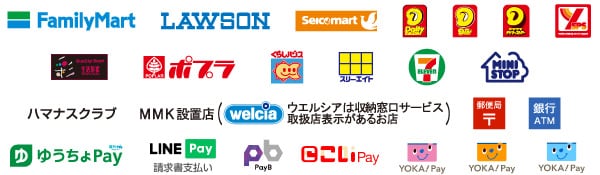
For inquiries about Mirai Barai payments, please click here.
AG Mirai Barai Co., Ltd. Post-Payment Service Center
TEL:03-6778-0175
[Contact person available weekdays 10:00-17:00]
TEL:03-6778-0175
[Contact person available weekdays 10:00-17:00]
~Important Notes Regarding the Use of the Post-Payment Service~
・Use of this service requires approval from AG Mirai Barai Co., Ltd.
Depending on the results of the review, you may not be able to use Mirai Barai.
The results will be sent to your registered email address once the review process is complete.
If, after review, you are unable to use the convenience store payment option, we will change your payment method to "cash on delivery" and ship the product.
Please note that if you switch to cash on delivery, the "cash on delivery" fee will apply.
• The invoice will not be included with the product and will be sent separately by mail from AG Mirai Barai Co., Ltd. (This may take approximately one week after the product arrives.)
・If you use our deferred payment service, we cannot forward the product to an address other than the delivery address you provided when placing your order.
*Due to system limitations, we are unable to make any changes to payment information after your order has been placed.
*Please note that we cannot accept cancellations or refusals of delivery if your order is deemed ineligible for deferred payment after the review process.
*If you request gift wrapping and the delivery address differs from the address registered in your membership information, you cannot use the convenience store payment (Mirai Barai) option.
*If you require same-day shipping, we cannot accept payment via convenience store payment after delivery.
*For details on the convenience store payment service, please check the "Mirai Barai" page on the AG Mirai Barai Co., Ltd. website.
Depending on the results of the review, you may not be able to use Mirai Barai.
The results will be sent to your registered email address once the review process is complete.
If, after review, you are unable to use the convenience store payment option, we will change your payment method to "cash on delivery" and ship the product.
Please note that if you switch to cash on delivery, the "cash on delivery" fee will apply.
• The invoice will not be included with the product and will be sent separately by mail from AG Mirai Barai Co., Ltd. (This may take approximately one week after the product arrives.)
・If you use our deferred payment service, we cannot forward the product to an address other than the delivery address you provided when placing your order.
*Due to system limitations, we are unable to make any changes to payment information after your order has been placed.
*Please note that we cannot accept cancellations or refusals of delivery if your order is deemed ineligible for deferred payment after the review process.
*If you request gift wrapping and the delivery address differs from the address registered in your membership information, you cannot use the convenience store payment (Mirai Barai) option.
*If you require same-day shipping, we cannot accept payment via convenience store payment after delivery.
*For details on the convenience store payment service, please check the "Mirai Barai" page on the AG Mirai Barai Co., Ltd. website.
About receipts
For credit card payment
We will use the statement issued by your credit card company in place of your receipt.
We will use the statement issued by your credit card company in place of your receipt.
In case of PayPay
We are unable to issue a receipt.
We are unable to issue a receipt.
In the case of deferred payment (pay-dee)
The usage details reflected on the customer screen [MyPaidy] that is automatically registered at the time of payment will be used as a receipt.
The usage details reflected on the customer screen [MyPaidy] that is automatically registered at the time of payment will be used as a receipt.
In case of cash on delivery payment
We will use the cash on delivery receipt issued by Yamato Financial Co., Ltd. that comes with the invoice in place of the receipt.
*This is an official receipt according to accounting laws and regulations recognized by the tax office.
We will use the cash on delivery receipt issued by Yamato Financial Co., Ltd. that comes with the invoice in place of the receipt.
*This is an official receipt according to accounting laws and regulations recognized by the tax office.
In case of GMO deferred payment
The invoice sent by GMO Payment Service, Inc. when you make a payment can be used as a receipt.
The invoice sent by GMO Payment Service, Inc. when you make a payment can be used as a receipt.
*If you are a taxable person and would like a qualified invoice, please request it from the inquiry form.
About delivery of products
*If purchased directly from the online store
1. Shipping fee
Nationwide flat rate of 550 yen (tax included)
2. Delivery company
Delivery will be made by Yamato Transport Co., Ltd. or Japan Post Co., Ltd.
*You cannot specify the shipping company.
*We are unable to accept pickup at courier centers or hold Yu-Pack packages at post offices.
*If you enter the address of each Yamato distribution center or post office, we will cancel your order as the product cannot be delivered.
*You cannot specify the shipping company.
*We are unable to accept pickup at courier centers or hold Yu-Pack packages at post offices.
*If you enter the address of each Yamato distribution center or post office, we will cancel your order as the product cannot be delivered.
3. Delivery location
This offer is limited to within Japan.
*We cannot ship overseas.
*We cannot ship overseas.
About leaving parcels at door or delivering to parcel boxes
Due to our contract with the delivery company, we cannot instruct the delivery company to leave packages at our door or deliver them to a parcel box.
If you wish to do so, please check the delivery information listed in the "Purchase/Reservation History" on your My Page or in the "Order Shipping Notification" email, and contact the shipping company directly.
If you wish to do so, please check the delivery information listed in the "Purchase/Reservation History" on your My Page or in the "Order Shipping Notification" email, and contact the shipping company directly.
4. Delivery time
The number of days it takes from order to shipping will vary depending on the timing of your order and the product.
Estimated shipping date from order completion email
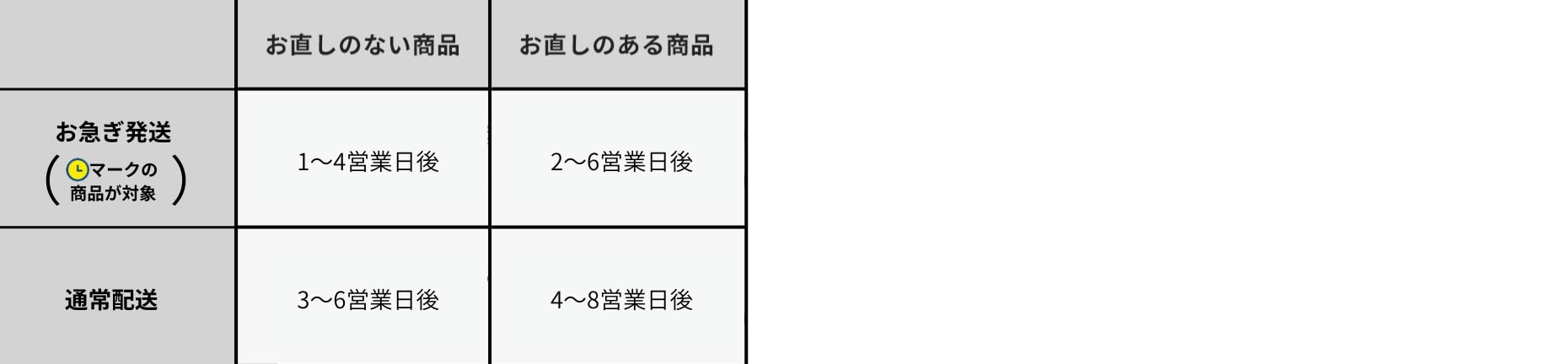
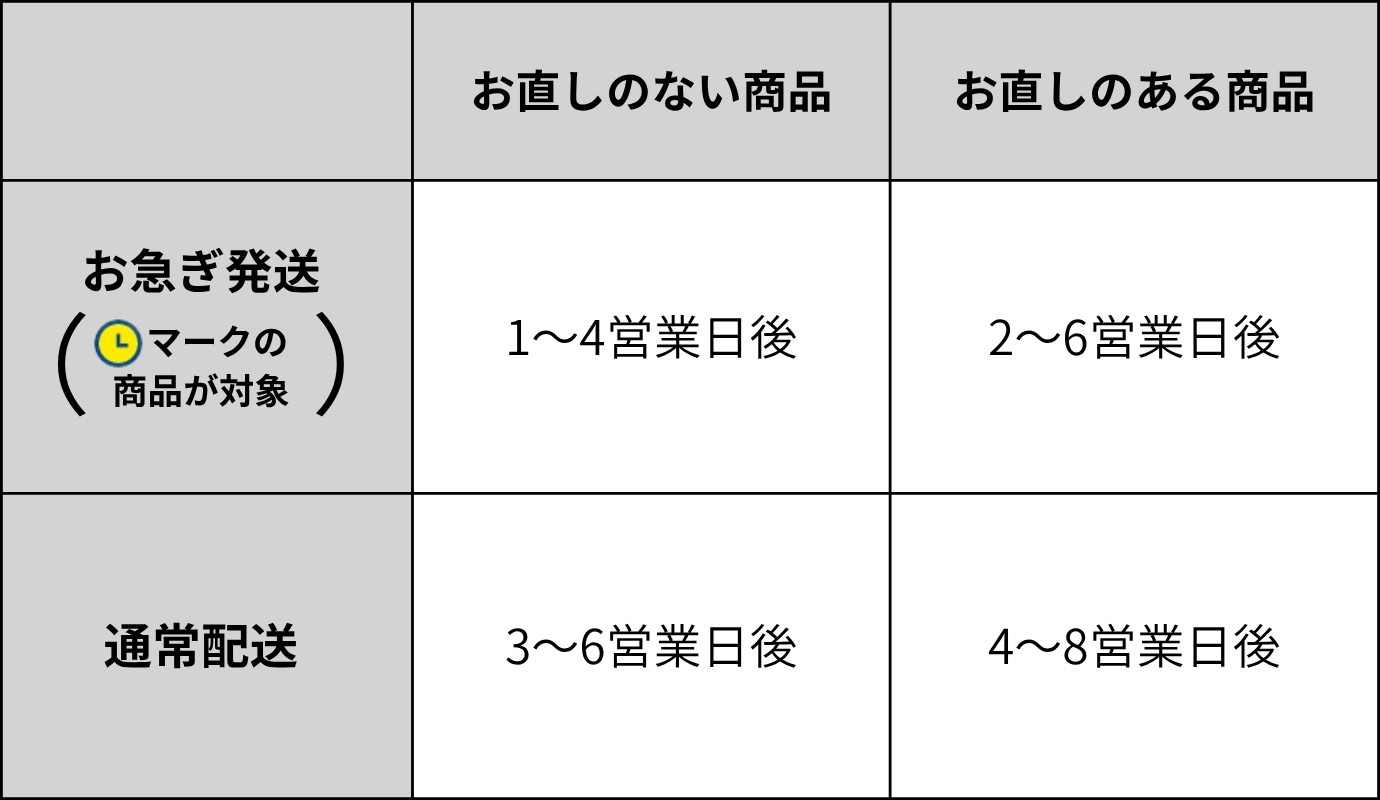
*If the waist of the pants needs to be altered, it will take the above number of days plus 2 days to ship.
*Delivery times may be longer than usual during the New Year holidays, Golden Week, and inventory periods.
*Delivery times may be longer than usual during the New Year holidays, Golden Week, and inventory periods.
Estimated delivery date

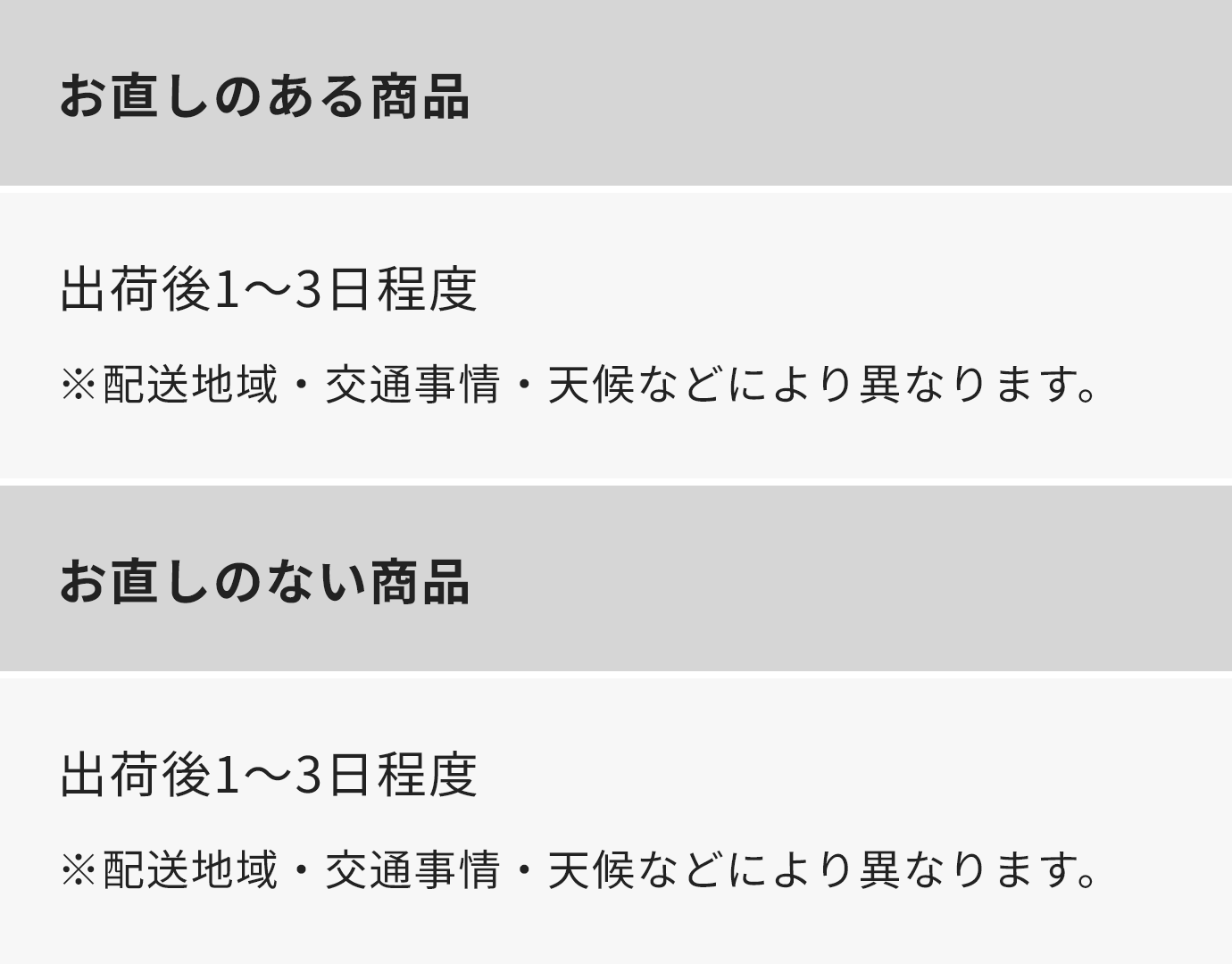
*If the correct postal code and address are not entered, the product may not be delivered on the desired date.
(Please be especially careful when using the rush delivery service or specifying a delivery date and time.)
*If the item is returned to the distribution center due to an unknown address, we will not be able to re-deliver it.
(Please be especially careful when using the rush delivery service or specifying a delivery date and time.)
*If the item is returned to the distribution center due to an unknown address, we will not be able to re-deliver it.
5. Specify delivery date and time
You can specify the date and time of delivery in the "Delivery Information" section of your cart.
Desired delivery day
Products with this mark can be ordered within 5 to 20 days from the day after the order date.Items without the mark can be ordered within 7 to 20 days from the day after the order date.*If you do not specify, the item will be delivered on the shortest delivery date.
Desired delivery day
Morning / 14:00 - 16:00 / 16:00 - 18:00 / 18:00 - 20:00 / 19:00 - 21:00
6. Expedited shipping service
If you use the express delivery service,Same-day shipping at the earliestI will do it.
Products with this mark are available for express shipping.
Products with this mark are available for express shipping.
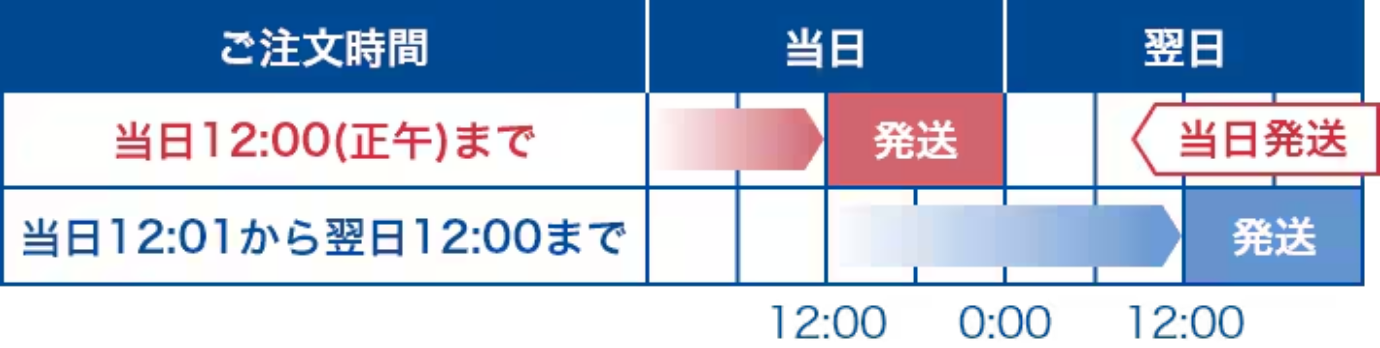
*Since we share product inventory with stores and various mall sites, there may be cases where items are out of stock or you are unable to select the expedited shipping service depending on the timing of your order.
7. Delivery details slip
A delivery slip will be included in the package.
*If the names of the orderer and recipient are different, please write "This is a delivery from Mr. ○○ (orderer's name)" on the invoice.
We will ship it to you.
*The above is different from the nationwide delivery service from the Aoyama clothing store.
We will ship it to you.
*The above is different from the nationwide delivery service from the Aoyama clothing store.
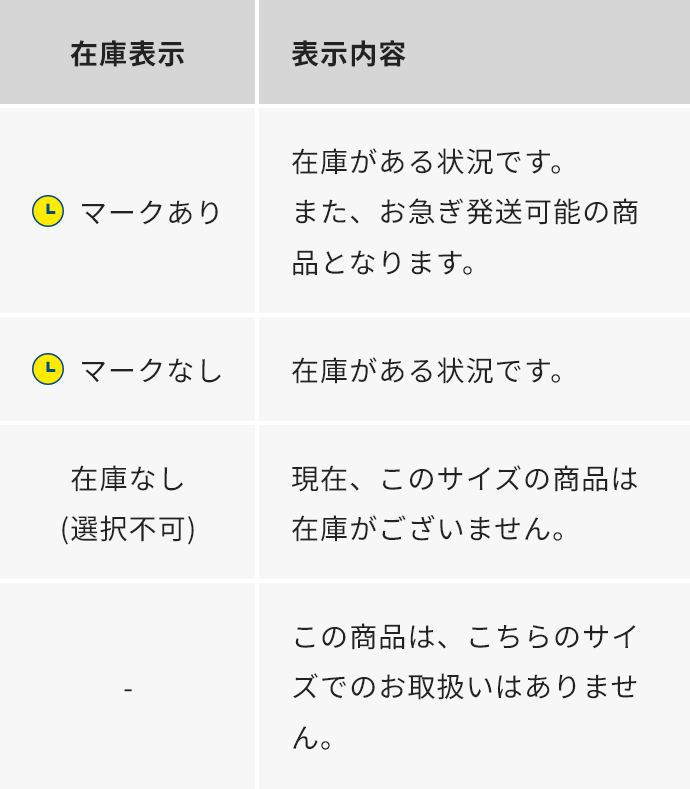
About inventory display
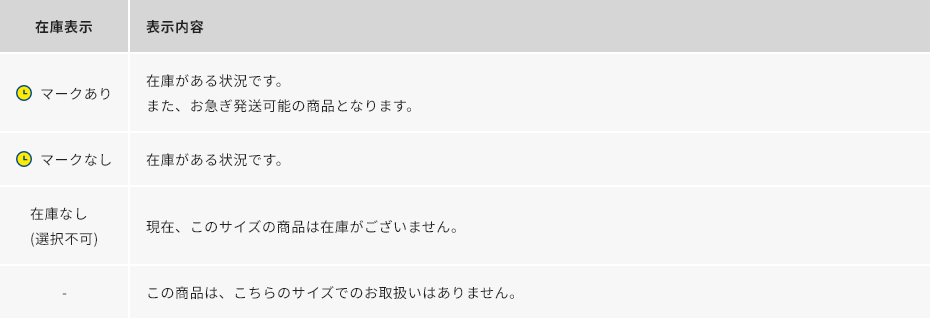
You can check the stock status of a product from the product list or product details page.
The inventory status is shown below.
The inventory status is shown below.
About special product discounts and coupons
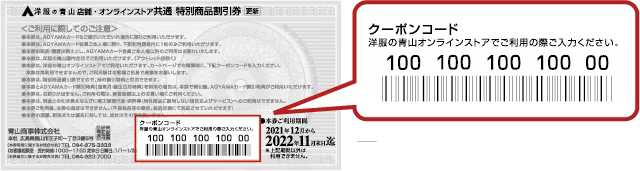
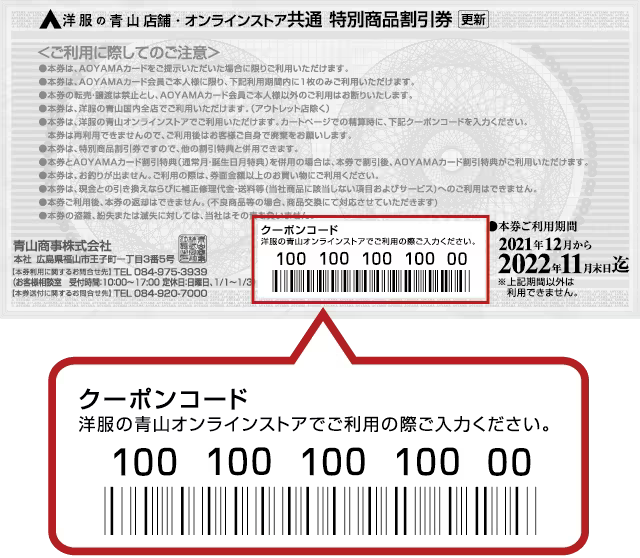
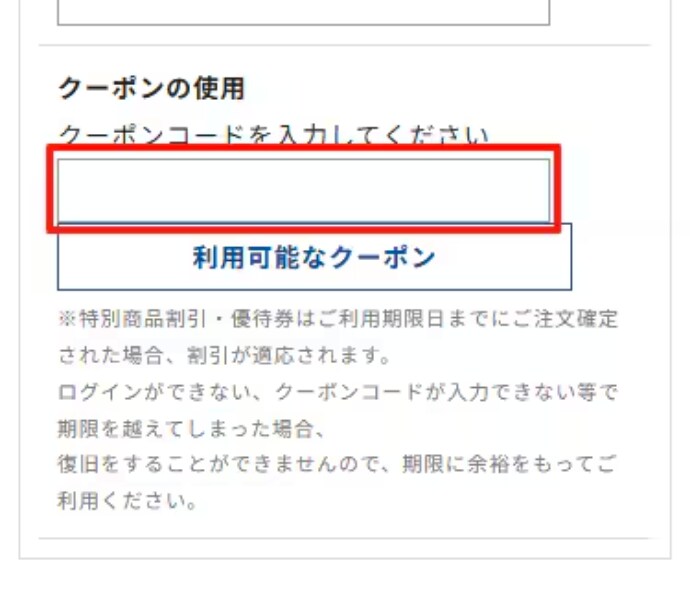
To use the ticket, you will need to enter the 14-digit number written on the back of the ticket on the cart page.
In addition, when using "Special Product Discount Coupons" or "Special Product Preferential Coupons", you must log in with your AOYAMA Card membership number, so please check when logging in.
In addition, when using "Special Product Discount Coupons" or "Special Product Preferential Coupons", you must log in with your AOYAMA Card membership number, so please check when logging in.
If you cannot use this, check here
If you do not log in with the email address registered to your AOYAMA card, the discount will not be applied.
Please check your login information before using.
If you are logged in using membership information other than your AOYAMA Card, please log out once and then re-enter the email address and password associated with your AOYAMA Card.
If you have not yet registered as a web member linked to an AOYAMA Card, please register by clicking on "New Registration/Link Point Card" on the member registration screen of the "Aoyama Clothing Official App."
▼App download
Please check your login information before using.
If you are logged in using membership information other than your AOYAMA Card, please log out once and then re-enter the email address and password associated with your AOYAMA Card.
If you have not yet registered as a web member linked to an AOYAMA Card, please register by clicking on "New Registration/Link Point Card" on the member registration screen of the "Aoyama Clothing Official App."
▼App download
Notes
・Can only be used by the AOYAMA cardholder within the card's expiration date.
・This voucher cannot be reused, so please dispose of it after use.
・This voucher cannot be used in conjunction with other discount offers.
・When using this voucher, it can be used for purchases equal to or greater than the face value of the voucher.
・This voucher cannot be used for correction repair costs, shipping fees, etc. (items and services that do not apply to our products).
Please note that you may not be able to use the service if it does not operate or display correctly due to your device or usage conditions.
- Expired "Special Product Discount Coupons" and "Special Product Preferential Coupons" cannot be used online or in-store.
・This voucher cannot be reused, so please dispose of it after use.
・This voucher cannot be used in conjunction with other discount offers.
・When using this voucher, it can be used for purchases equal to or greater than the face value of the voucher.
・This voucher cannot be used for correction repair costs, shipping fees, etc. (items and services that do not apply to our products).
Please note that you may not be able to use the service if it does not operate or display correctly due to your device or usage conditions.
- Expired "Special Product Discount Coupons" and "Special Product Preferential Coupons" cannot be used online or in-store.
Coupon code location (back of ticket)
Where to enter the coupon code on the cart screen
About product prices
All product prices displayed on the online store include tax.
Please note that some of the tags and stickers attached to products may show prices excluding tax.
Please note that some of the tags and stickers attached to products may show prices excluding tax.